Comparison
Best Screen Recorders in 2026: An Honest Comparison
Last updated: September 2026 · 10 min read
Screen recorders used to capture pixels and stop there. The best ones now behave like a small post-production studio: they zoom, spotlight, caption, and trim your recording for you, with no video editor in sight. Screen Studio and FocuSee have been in this category for a while. Recordio is the newer entrant, and it takes a different approach to the same problem.
We're the team behind Recordio, so we're biased. We also use all three tools constantly. Below is a straight comparison of features and pricing, including the places where a competitor is the better pick.
1. Recordio: The Best Pick for Web App Recordings
Platforms: Chrome extension (also works in Edge and Brave) on Mac, Windows, Linux, and ChromeOS
Pricing: Free plan · Pro $12 per seat/month billed annually · $15 per seat/month billed monthly
Recordio doesn't run as a desktop app that watches your screen. It runs inside your browser as an extension. That sounds like a small distinction, but it changes what the recorder can know about your video.
Why the Browser Extension Approach Matters
Because Recordio lives inside Chrome, it sees more than pixels. It understands the layout of the web app you're recording: which elements are on the page, how big they are, and how they relate to each other. It doesn't read your content, only the structure. It knows when you're hovering over a card, when you're typing into an input, and whether the thing under your cursor is a dropdown, a modal, or a sidebar.
That page awareness powers two features no other screen recorder can match:
DOM-Aware Auto Zoom
Most screen recorders zoom by following your cursor. The result is jittery and imprecise, and it clips things constantly: you zoom toward a form and the input you're typing in gets cut off at the edge. Worse, the auto-zooms these tools generate usually can't be edited. If one looks wrong, you delete it and redo it by hand.
Recordio targets the actual UI element you're interacting with, so the frame lands on the whole input, the whole card, or the whole menu. Every zoom is a keyframe on the timeline, so you can adjust timing, position, and framing without starting over.
For product demos, onboarding walkthroughs, and bug reports recorded in a web app, this is the whole pitch. Press record, do the thing, and the zoom just works.
Auto Spotlight (3D Card Elevation)
Only Recordio does this. When you hover over a card, popover, or other interactive element, Recordio lifts it forward with a subtle 3D elevation and glow while dimming the background. It's completely automatic and gives the viewer's eye somewhere to land.
Features Only Recordio Has
Beyond the DOM-aware intelligence, a few features are unique to Recordio:
Device Frame Wrapping
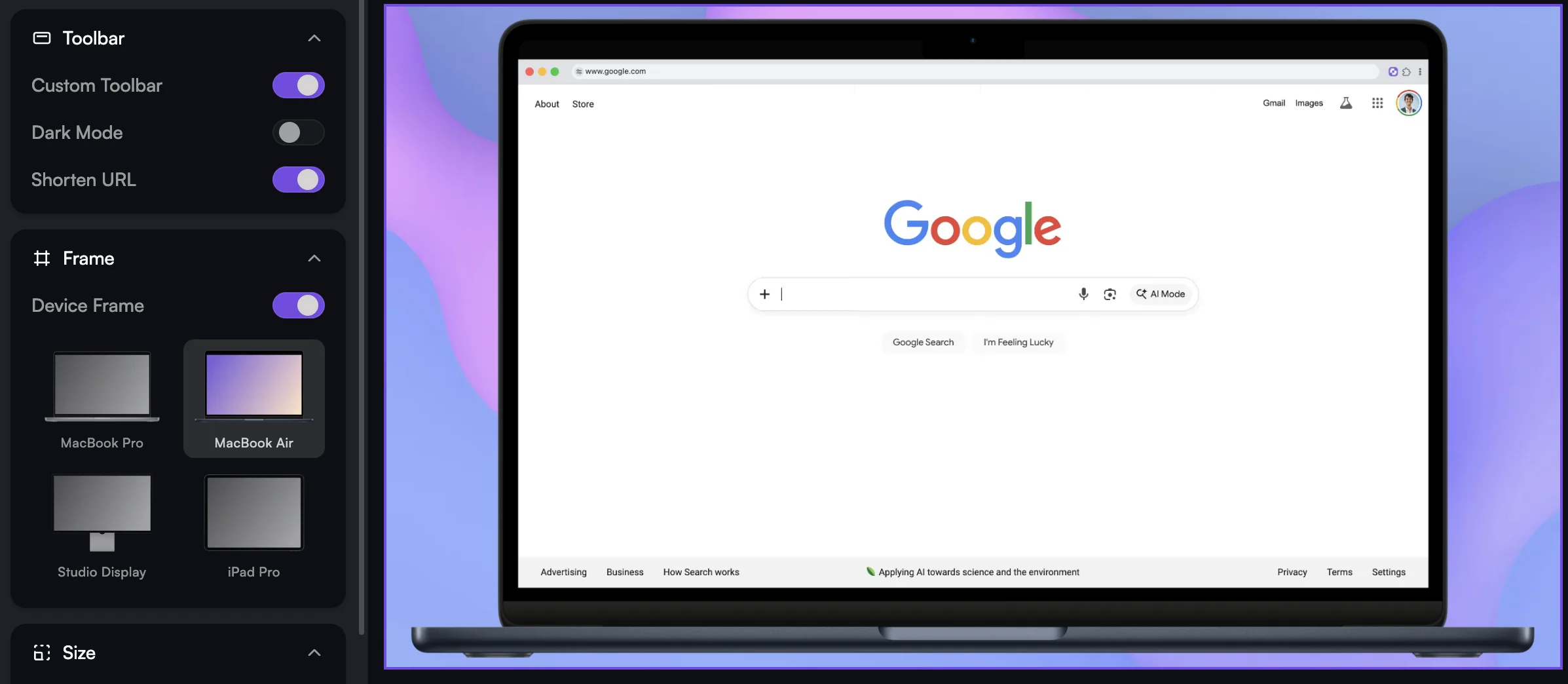
Recordio can wrap your recording in a MacBook Pro or MacBook Air frame. Instead of a flat screen capture, your video looks like it's playing on a real device. It's a small touch that makes product demos and marketing clips look noticeably more finished.
Smart AutoCut
AutoCut removes dead air, but it isn't just listening for silence. It also watches your interactions with the page. If you're quiet but actively typing or clicking, that footage stays. It only cuts when there's no voice and no interaction, which is usually the moment you're thinking about what to say next.
Voice-only silence detection tends to cut the parts where you're doing something important but not narrating it. AutoCut doesn't make that mistake.
Clean Chrome Toolbar
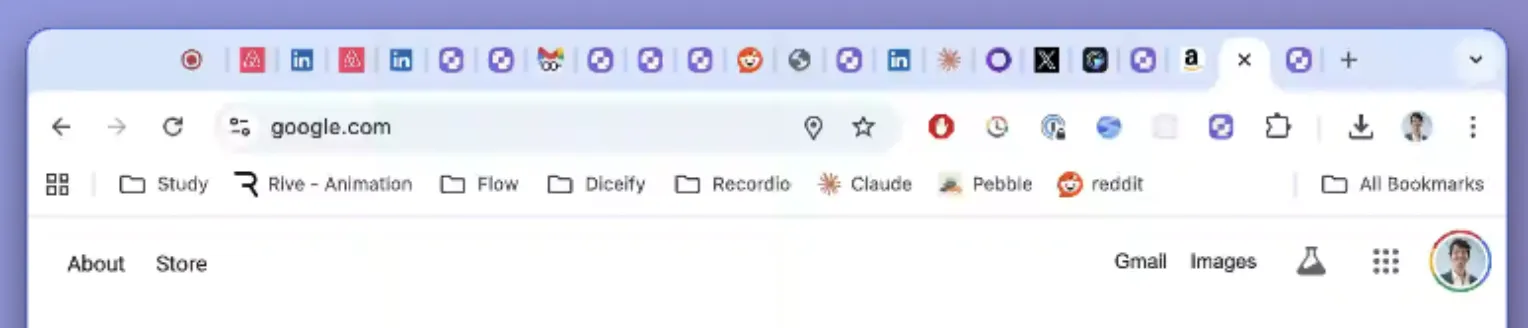
If you've ever recorded a Chrome window and cringed at your bookmark bar, 47 open tabs, and a pile of extension icons, this one is for you. Recordio replaces the real toolbar with a clean, minimal bar that shows just the page title. No messy bookmarks, no stray tabs, no embarrassing URLs.
 BEFORE
 AFTER
AFTERShareable Links, View Analytics, and a Team Library
Instead of exporting a file and sending it around, Recordio Pro lets you share a link. Anyone with the link can watch, and you can see how the video performed: total views and average watch time. Pro also includes a shared team library with unlimited viewer seats, so your teammates can browse and watch recordings without each needing a paid seat. If you've been using Loom for this workflow, Recordio gives you the same sharing with much better-looking output.
Other Notable Features
- AI Captions with Word-Level Timing: OpenAI-powered captions that track to the individual word. Edit any mistake in place, or highlight a caption line and delete it to cut that segment from the video. No timeline scrubbing.
- Overlays and Blur: Blur out sensitive information, or add text, arrows, and shapes to call out what matters.
- Backgrounds and Music: Pick from a curated library, build a gradient, or upload a brand image. Add a music track from the built-in library.
- Smart Webcam Overlay: Add your face with customizable position and style. It shrinks out of the way when a zoom kicks in so it never covers what you're showing.
- Cloud Rendering on Pro: Free plan videos render in your browser tab. On Pro, rendering happens on our servers, so you can close the tab and come back when it's done.
- Cross-Platform by Default: It's a browser extension, so it works everywhere Chrome, Edge, or Brave do. No macOS lock-in.
Where Recordio Falls Short
If you mostly record native desktop apps (Figma desktop, Xcode, Final Cut), Recordio's auto-zoom and auto-spotlight won't fire automatically, because they rely on reading the browser DOM. You can still record these apps through screen or window capture and add zooms and spotlights manually in the editor. The zoom and spotlight timelines are simpler than what Screen Studio and FocuSee offer, and since cursor-based auto-zoom usually needs manual cleanup anyway, you may still come out ahead. But it's not the zero-effort experience you get with web apps. Native desktop apps are on our roadmap.
Free to Start, No Credit Card
Recordio's free plan isn't a trial. It includes auto zoom, auto spotlight, silence cutting, the background and music library, and 1080p downloads, for up to 5 active projects. Pro adds 4K exports, AI captions, shareable links, cloud rendering, and the team library. Neither Screen Studio nor FocuSee offers any free export at all.
2. Screen Studio: The macOS Pioneer
Platforms: macOS only
Pricing: $9/mo billed annually ($108/yr) · $29/mo monthly · No free plan · One-time licenses are no longer sold
Screen Studio created the "beautiful screen recording" category. It has been the dominant choice on macOS for years, and for good reason: smooth cursor-following zoom, cinematic motion blur, and a big library of wallpapers and backgrounds.
Strengths
- Mature product: More years of polish, more edge cases handled, and a large, loyal user base.
- Full desktop capture: As a native macOS app, it records any app on your system with equal fidelity, not just browser tabs. It can also pull higher webcam resolutions and frame rates, though that rarely shows once the webcam is tucked in a corner.
- Motion blur and cursor smoothing: Transitions get cinematic motion blur and cursor movement is smoothed, which gives recordings a polished feel.
Weaknesses
- macOS only: If anyone on your team uses Windows or Linux, Screen Studio is out.
- Cursor-based zoom only: It follows the mouse, so it doesn't know what you're interacting with. Zooms feel imprecise in dense UIs where elements sit close together.
- No auto-spotlight: Nothing equivalent to Recordio's 3D card elevation.
- No free plan: There's no way to export a video without paying. Recordio's free plan is genuinely free.
- Pricier month to month: $29/mo versus Recordio's $15. On annual billing Screen Studio is slightly cheaper ($9/mo versus $12), but you're paying for one Mac app rather than a cross-platform tool with links and a team library.
- No view analytics or team library: You can share a file, but there's no insight into who watched or a shared place for your team's recordings.
- No clean toolbar: Your browser chrome is whatever it is.
3. FocuSee: The AI Avatar Bet
Platforms: Windows, macOS
Pricing: $19.99/mo · $49.99/yr standard · $79.99/yr advanced · $199.99 one-time (tied to the current major version) · No free plan
FocuSee is a cross-platform desktop app that borrows heavily from Screen Studio's editing model. Where it differs is its bet on AI: AI-generated avatars, AI voice replacement, and AI-assisted content creation. If you want a talking-head video without recording yourself, FocuSee is one of the few tools offering it.
That bet is a mixed one. Viewers can usually tell when a voice is synthetic or an avatar is generated, and engagement drops when they do. Real voice and a real face still outperform AI stand-ins in product demos and tutorials.
Beyond the AI features (which run on a credit system, so heavy use costs extra), FocuSee offers the same cursor-based zoom as Screen Studio, with no DOM awareness, no auto-spotlight, no device frames, no toolbar cleanup, and no free plan.
Pricing Comparison
| Recordio | Screen Studio | FocuSee | |
|---|---|---|---|
| Monthly | $15 per seat | $29 | $19.99 (without AI) |
| Annual | $12 per seat/mo ($144/yr) | $9/mo ($108/yr) | $49.99/yr (without AI) |
| One-time license | No | No longer offered | $199.99 (current major version) |
| Free plan | Yes (5 active projects, 1080p downloads) | No | No |
| Shareable links | Yes, with view analytics (Pro) | Yes | Yes |
| Platforms | Chrome, Edge, Brave (any OS) | macOS only | Windows, macOS |
Feature Comparison
| Feature | Recordio | Screen Studio | FocuSee |
|---|---|---|---|
| Auto Zoom | DOM-aware + cursor | Cursor-based | Cursor-based |
| Auto Zoom Editable | Yes (keyframes) | No (delete & redo) | No (delete & redo) |
| Auto Spotlight | Yes (3D elevation) | Dimming only | Dimming only |
| Device Frames | Yes | Yes | No |
| Smart AutoCut | Voice + interaction | Basic | Basic |
| Clean Toolbar | Yes | No | No |
| AI Captions | Yes, word-level, edit to cut | Yes | Yes |
| Overlays & Blur | Yes | Yes | Yes |
| Webcam Overlay | Yes, auto-shrinks on zoom | Yes | Yes |
| Shareable Links | Yes, with view analytics | Yes | Yes |
| Team Library | Yes (Pro) | No | No |
| Music | Yes | Yes | No |
| Custom Backgrounds | Yes | Yes | Yes |
| AI Avatars | No | No | Yes |
The Bottom Line
If you record web apps (SaaS products, internal tools, dashboards, anything in a browser), Recordio is the best pick. DOM-aware zoom and spotlight produce results that cursor-tracking tools can't, and device frames, AutoCut, and the clean toolbar round it out. It's also the only one of the three with a real free plan, and the only one built around sharing: links, view analytics, and a team library that works on every operating system.
If you live in the macOS native app ecosystem and rarely record browser content, Screen Studio remains a strong, mature choice. It's Mac-only and has no free plan, but it's proven.
If you want AI-generated avatars and voice replacement, FocuSee is about the only option here. Just know that audiences still prefer authentic recordings.
For most people building, demoing, or documenting web-based products in 2026, Recordio is the best screen recorder you can get.