Comparison
Best Loom Alternatives in 2026: Why Teams Are Switching
By John Mikhail, founder of Recordio · Last updated: September 2026 · 9 min read
Loom pioneered async video for teams. The idea was simple: record your screen, share a link, skip the meeting. It worked, and millions of people adopted it.
In 2026, Loom's value is harder to justify. Business seats run $15 per user per month billed annually ($18 monthly), and Business + AI runs $20 per user per month ($24 monthly). For a team of 20, that's $3,600 to $4,800 a year for what is still a fairly basic recording tool. The free Starter plan caps you at 25 videos of 5 minutes each.
The bigger issue is quality. Loom has added AI zoom and manual spotlight tools, but the results are basic: cursor-following zoom that doesn't understand what you're interacting with, and shapes you draw yourself. Most Loom videos are shared internally, so there has been little pressure to go further. What you record is still mostly what you get.
We're the team behind Recordio, so we're biased. But we built it specifically to fix this: studio-quality recordings that are just as easy to share, at a lower price per seat. Here's why teams are switching. If you only want the feature table and a five-person price, go straight to Recordio vs Loom.
The Quality Gap: Why Loom Videos Look Like Loom Videos
You've seen it. Someone shares a Loom and it's a flat screen recording with a webcam bubble, visible browser clutter, and nothing telling the viewer where to look. It gets the job done internally. Send it to a prospect or a client, or drop it into documentation, and it falls flat.
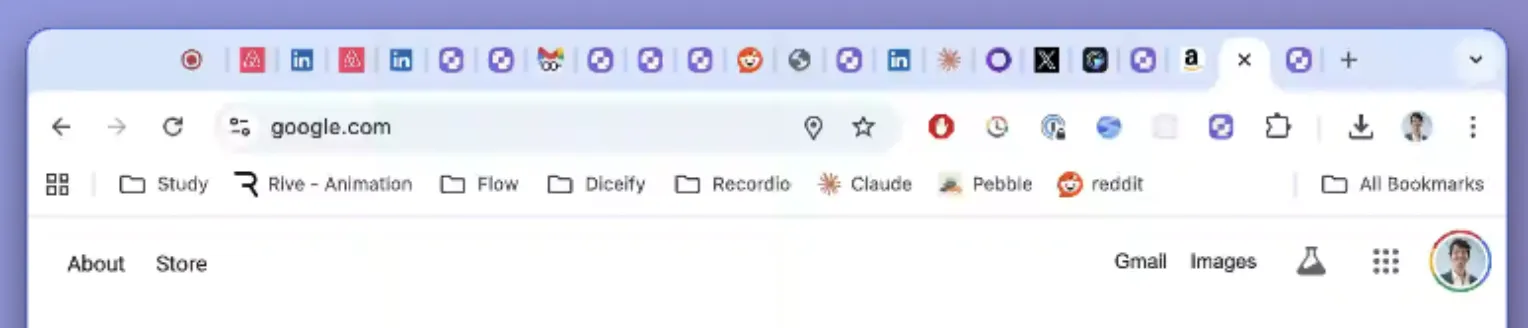
Recordio changes that. Every recording gets DOM-aware auto zoom (it reads your page's structure and zooms to the right element), auto spotlight that lifts the element you're interacting with off the page with a 3D effect, and a clean Chrome toolbar that hides your bookmarks and 47 open tabs. The result is a studio-quality video, produced automatically, with no manual editing.
Here's what the difference looks like:
The "before" is essentially what Loom gives you. The "after" is what Recordio produces from the same recording session with zero manual edits: auto zoom, auto spotlight, a device frame, a background, and a clean toolbar, all applied automatically.
Recordio: Loom's Shareability + Studio Quality
Recordio keeps the sharing workflow people like about Loom and adds the production quality Loom has never had. Here's what makes it a real alternative:
Shareable Links, View Analytics, and a Team Library
Just like Loom, you share a link and anyone with it can watch. Recordio also shows you how the video performed, with total views and average watch time, so you know whether people actually watched. Pro includes a shared team library with unlimited viewer seats: your teammates can browse and watch everything without each needing a paid seat.
Studio-Quality Output, Zero Effort
This is where Recordio pulls ahead of everything else. Because it runs as a Chrome extension, it reads the structure of the web app you're recording. It knows what you're clicking on, what you're hovering over, and what deserves the viewer's attention. That page awareness powers:
- DOM-Aware Auto Zoom: Zooms to the exact UI element you're interacting with, so inputs and forms never get clipped. No jittery cursor-following, and every zoom is an editable keyframe.
- Auto Spotlight (3D Card Elevation): When you hover over a card or interactive element, Recordio lifts it forward with a subtle glow while dimming the background. Completely automatic.
- Clean Chrome Toolbar: Replaces your bookmarks, tabs, and extension icons with a minimal bar that shows just the page title.
- Device Frame Wrapping: Wraps your recording in a MacBook Pro or MacBook Air frame so product demos look finished.
 BEFORE
 AFTER
AFTERSmart AutoCut
Loom recordings are full of dead air: the pauses where you're deciding what to say or navigating to the next screen. Recordio's AutoCut removes that silence automatically. It tracks both your voice and your interactions, so it won't cut footage where you're quietly typing or clicking through something important.
More Ways Recordio Goes Further
- AI Captions You Can Edit to Cut: OpenAI-powered captions timed to the word. Fix any mistake in place, or delete a caption line and that segment is cut from the video.
- Overlays and Blur: Blur sensitive data before you share, or add text, arrows, and shapes to point at what matters.
- Backgrounds and Music: A curated background library, custom gradients, brand image uploads, and a music library.
- Smart Webcam Overlay: Customizable position and style, and it shrinks out of the way when a zoom kicks in.
- 4K Exports on Pro: Download in 1080p on the free plan or 4K on Pro, alongside the shareable link.
- Team Workspace: Invite teammates with roles, collaborate on projects, and keep every walkthrough in a shared team library on Pro. Viewer seats are unlimited and free.
- Full-Page Screenshots: The same extension captures the visible area, the full page, or a region. Annotate it in the web app with text, arrows, shapes, and blur, then copy it, download a PNG or PDF, or share a link.
- Cross-Platform: Works in Chrome, Edge, and Brave on Mac, Windows, Linux, and ChromeOS.
Cost: Lower Per Seat, Free for Viewers
Recordio Pro is $12 per seat per month billed annually, or $15 monthly. Loom Business is $15 per user annually, or $20 with AI. Only the people who record need a Recordio seat; viewers are unlimited and free. And the free plan isn't a trial: it includes auto zoom, auto spotlight, silence cutting, and 1080p downloads for up to 5 active projects, with no credit card. For team pricing, reach out to [email protected].
What About Screen Studio?
Screen Studio is a macOS-only desktop app that produces polished recordings with cursor-based auto zoom and motion blur. It's a solid tool for making demos look good. But it's not a Loom replacement: there's no free plan, no shared video library, no view analytics, and no team features. It's a recording and editing tool, not an async communication platform, and it leaves out anyone on Windows or Linux. We list eight options for those users in best Screen Studio alternatives.
Leaving a Different Tool?
The same honest format, with pricing checked on each vendor's own site, is available for the other recorders teams tend to outgrow: best Camtasia alternatives for demos without a timeline, best Bandicam alternatives for Mac and Linux users, and best Screencastify alternatives for schools and Chrome users. Every head-to-head lives on the compare page.
Recordio vs Loom: Feature Comparison
| Feature | Recordio | Loom |
|---|---|---|
| Shareable Links | Yes, with view analytics | Yes |
| Auto Zoom | DOM-aware (reads page structure) | Cursor-based (AI) |
| Auto Zoom Editable | Yes (keyframes) | No |
| Auto Spotlight | Automatic, 3D elevation | Manual shapes (circles, arrows) |
| Device Frames | Yes | No |
| Smart AutoCut | Voice + interaction aware | Filler word removal (AI plan) |
| Clean Toolbar | Yes | No |
| AI Captions | Yes, word-level, edit to cut | Yes |
| Overlays & Blur | Yes | Basic |
| Custom Backgrounds | Yes | Yes |
| Team Library | Yes (Pro) | Yes |
| Viewer Seats | Unlimited, free | Free viewers |
| Free Plan | 5 active projects, 1080p downloads | 25 videos, 5 min each |
| Pro Price | $12/seat/mo annual · $15 monthly | $15/user/mo annual · $20 with AI |
The Bottom Line
Loom set the standard for async video at work. But in 2026, "record your screen and share a link" is table stakes. What Loom hasn't done is make recordings look good, and that's where Recordio wins.
You get the same shareable links and view analytics, but your videos come out looking like a design team produced them. Auto zoom that understands what you're showing, spotlight effects that guide the eye, a clean toolbar, device frames, and smart silence removal. All of it automatic, at a lower price per seat.
If your team records web apps, documents processes, or creates product demos, Recordio is the Loom alternative worth trying. The free plan makes it risk-free to see the difference for yourself, and the full Recordio vs Loom comparison has the feature table.